
The document sends itself
Word, Excel or PDF — Fabreasy handles the recipient,
branding, signature and password. Automatically.
This is what happens
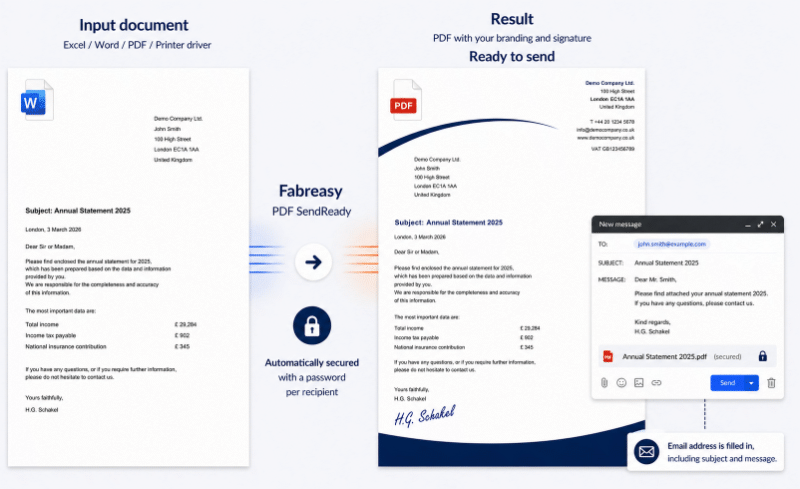
One click or drag-and-drop. Fabreasy reads the document, handles everything and prepares the email. You review and click send.
See how it works
In practice, it really is this simple
THIS IS HOW IT GOES NOW
The information is in the document.
So why is the sending still manual?
Every day, employees retype email addresses, compose the email and check if everything is correct. Not because they are careless — but because the document and the sending are two separate worlds.
THIS ALMOST ALWAYS WORKS.
UNTIL IT DOESN’T.
- Email address mistyped
- Wrong attachment added
- Signature forgotten
- Password not set
- Wrong version sent
- Wrong recipient
- Email, subject or body not filled in
EMAIL ADDRESS IS IN THE DOCUMENT.
FABREASY USES IT.
- Always the right recipient
- Always the right version
- Always the right branding
- Always the right signature
- Automatically secured per recipient
- Never a forgotten attachment
- You click send
Result
What Fabreasy handles for you
Right recipient
The email address is in the document. Fabreasy reads it. No copy-paste, no mistakes.
Signature
Placed in the right position using text recognition. No manual positioning.
Consistent branding
Letterhead and continuation pages added automatically — always consistent, regardless of source.
Unique password
Automatically generated per recipient based on their email address. Only the right person can open it.
4.7
★★★★★
based on 38 reviews · View on Capterra ↗
Ease of use: 4.6 / 5 Customer support: 4.7 / 5 Value for money: 4.8 / 5 Recommendation rate: 90%
★★★★★
“Converting to a branded PDF is incredibly fast and easy. The service is excellent — always quick to respond with tailored advice.”
Mieke
Finance employee
★★★★★
“Fabreasy ensures every PDF that leaves our office has a perfect professional appearance. The Office integration is seamless.”
Frank
Administration
★★★★★
“Super fast conversion of reports to our own letterhead. Very fast and user-friendly, quick and easy installation for multiple users.”
Dennis
Administration
Used by, among others































Runs locally on your Windows PC · No cloud, no external servers · Documents never processed by third parties · Developed in the Netherlands
One click. Everything is right.
Free to download and try for 14 days.
No subscription, no cloud. Then £129 per user per year.